
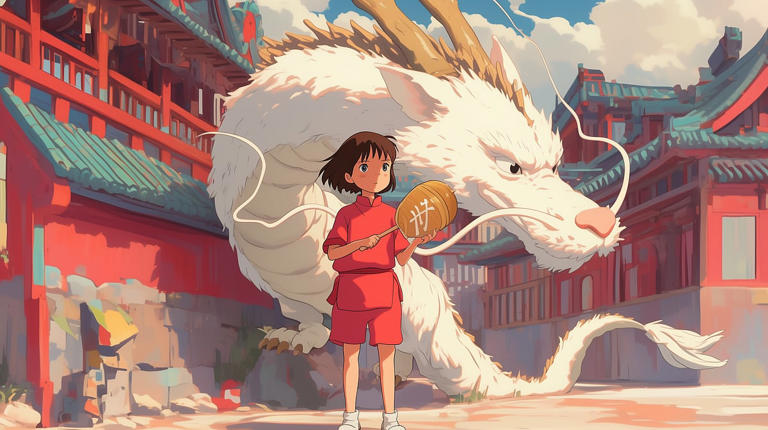
Unleashing Studio Ghibli Magic with ChatGPT: 5 Expert Strategies to Master AI Art
Where Imagination Meets Algorithm
By: Javid Amin
Studio Ghibli’s films—think Spirited Away or My Neighbor Totoro—are celebrated for their whimsical worlds, intricate details, and emotional depth. Now, with ChatGPT’s upgraded GPT-4o image generator, you can channel that same magic into your own creations. Whether you’re a hobbyist, marketer, or digital artist, this guide reveals five transformative strategies to craft Ghibli-inspired masterpieces. Dive in to unlock the full potential of AI artistry.
01. Precision Prompts: The Art of Specificity
Headline: “From Fuzzy to Fantastical: How Specificity Transforms AI Art”
Why Specificity Matters
Generative AI like ChatGPT thrives on clarity. Vague prompts like “draw a forest” often yield generic results. But a detailed prompt acts like a creative blueprint, guiding the AI to align with your vision.
Step-by-Step Guide to Crafting Precision Prompts
- Define the Core Subject: Start with the central element (e.g., “a young girl in a sunflower field”).
- Add Contextual Layers: Describe the mood, era, or cultural influences (“1980s rural Japan, golden hour lighting”).
- Specify Artistic Style: Use keywords like “Ghibli watercolor aesthetic” or “soft, dreamlike textures.”
- Include Technical Details: Mention rendering techniques (“cell-shaded characters, blurred backgrounds”).
Example Prompt Evolution
- Vague: “A castle in the sky.”
- Specific: “A floating steampunk castle with rusted copper gears, surrounded by cotton-candy clouds in a Studio Ghibli-inspired anime style, vibrant pastel colors, and a warm sunset glow.”
Pro Tip: Use analogies to refine your vision. For instance, “Make the sky look like the aurora borealis in Howl’s Moving Castle.”
Also Read | Own a Piece of Kashmir’s Digital Legacy: Pre-Owned Websites on Sale
02. Style Alchemy: Experimenting Beyond Ghibli
Headline: “Beyond Totoro: How to Bend AI Art Styles Like a Pro”
Why Experiment with Styles?
While Ghibli’s charm is timeless, blending styles can lead to unexpected brilliance. ChatGPT supports diverse aesthetics:
- Voxel Art: Blocky, pixelated textures (think Minecraft meets Princess Mononoke).
- Rubber Hose Anime: 1930s cartoonish flair with bendy limbs.
- Oil Painting: Classic textures for a nostalgic feel.
Case Study: Reinventing a Ghibli Scene
- Original Prompt: “A forest spirit in a mystical grove.”
- Style-Blended Prompt: “A rubber hose-style forest spirit with exaggerated eyes, dancing in a neon-lit grove, blending Studio Ghibli’s whimsy with 1980s retro synthwave.”
Step-by-Step Style Mixing
- Choose a Base Style: Start with Ghibli’s hallmarks (soft lines, nature themes).
- Layer a Secondary Aesthetic: Add keywords like “cyberpunk neon” or “medieval tapestry.”
- Adjust Rendering Techniques: Use terms like “matte painting” or “graffiti textures.”
Pro Tip: Explore culture fusion prompts like “Ghibli characters in a Van Gogh starry night.”
03. Iterative Editing: Refining Your Vision
Headline: “AI as Your Creative Partner: Edit, Refine, Perfect”
Why Editing Matters
Even the best prompts may need tweaks. ChatGPT allows real-time edits, letting you refine details without starting over.
Common Edits & How to Execute Them
- Character Adjustments:
- Initial Output: A girl with closed eyes.
- Edit Prompt: “Reopen her eyes to show determination, with a sparkle reflecting sunlight.”
- Background Enhancements:
- Initial Output: A plain meadow.
- Edit Prompt: “Add a hidden cottage with smoke rising from the chimney and fireflies glowing at dusk.”
User Story: María, a digital artist, used iterative edits to transform a basic “robot cat” into a “Ghibli-style robotic guardian with cherry blossoms etched into its metal plating.”
Pro Tip: Use comparative language like “less gloomy, more hopeful” to adjust mood.
Also Read | Worried About Your Online Presence? Here’s How We Make You Stand Out
04. Aspect Ratio Mastery: Framing Your Story
Headline: “From Square to Cinematic: Aspect Ratios That Wow”
Why Ratios Matter
The right aspect ratio enhances storytelling. For example:
- 9:16 (Vertical): Ideal for TikTok or Instagram Stories (flying scenes with towering trees).
- 16:9 (Widescreen): Perfect for YouTube thumbnails (panoramic landscapes).
- 1:1 (Square): Great for album art or profile pictures (character close-ups).
Step-by-Step Ratio Selection
- Identify the Platform: Social media, print, or video.
- Match Ratio to Emotion:
- Epic scale: Use 21:9 for vast horizons.
- Intimacy: Use 4:5 for portraits.
Example: A 9:16 vertical image of “Kiki’s Delivery Service flying over a seaside village at dawn” captures height and motion.
Pro Tip: For print projects, specify “300 DPI resolution” to ensure clarity.
05. Text Integration: When Words Meet Art
Headline: “Beyond Images: Crafting Visual Stories with Text”
Why Add Text?
Text can contextualize your art—think book covers, posters, or memes. While ChatGPT struggles with complex text, it handles short phrases effectively.
Tactics for Seamless Text Integration
- Simple Overlays:
- Prompt: “Add ‘Welcome to the Hidden Valley’ in a rustic wooden signpost.”
- Stylized Typography:
- Prompt: “Write ‘Adventure Awaits’ in glowing runes on a ancient stone gate.”
Avoiding Pitfalls
- Keep It Brief: Use 1-3 words for best results.
- Specify Font Style: “Calligraphy,” “futuristic neon,” or “handwritten chalk.”
Case Study: A user generated a Ghibli-style café scene with the text “Magic Brews Here” on a hanging sign, enhancing the storytelling.
Also Read | Transform Your Social Media Presence into a Career Magnet
Bonus: Ethical AI Art & Practical Tips
Headline: “Creating Responsibly: Ethics, Watermarks, and Subscriptions”
Key Considerations
- No Watermarks: Unlike DALL-E, GPT-4o images lack visible watermarks. Always credit AI involvement.
- Pricing: ChatGPT Plus starts at ₹1,999/month. Teams/API plans suit heavy users.
- Ethical Use: Avoid generating copyrighted characters or sensitive content.
Pro Workflow for Professionals
- Concept Sketch: Draft a rough idea.
- Generate Multiple Variations: Use prompts like “Option 1: daytime, Option 2: twilight.”
- Post-Process: Use tools like Photoshop to refine text or colors.
Bottom-Line: Your Canvas Awaits
ChatGPT’s GPT-4o isn’t just a tool—it’s a gateway to worlds unseen. By mastering specificity, style blending, and smart editing, you can create art that rivals Ghibli’s enchantment. Ready to bring your imagination to life? Start prompting, experiment fearlessly, and share your creations with #AIMagic!